



You can use a standard Azure App Service paired with Azure Private Link, Application Gateway, and VPN to build a highly secure and production ready environment. This architecture allows clients located in your private network or on-premises to securely access an app, while safely exposing the app to the internet via a Web Application Firewall (WAF), eliminating direct exposure from the public internet.
When you use this architectural pattern for your app, you can:
- Secure your app by configuring a private endpoint and disabling direct public network access.
- Securely connect to your app from on-premises networks that connect to the virtual network using a VPN
- Safely expose the app to the public internet using an Azure Application Gateway with WAF.
- Maintain a functioning CI/CD pipeline using a self-hosted build agent within the virtual network.
- Significantly reduce costs by avoiding the need for a dedicated Azure App Service Environment (ASE).
Important
This architecture is applicable for Windows and Linux apps, containerized or not, hosted on the following App Service plans: Basic, Standard, PremiumV2, PremiumV3, PremiumV4 and Functions Premium and Flex Consumption.
Conceptual overview
Azure App Service is a powerful PaaS offering, but by default, it does not offer the same network isolation as IaaS or an App Service Environment (ASE). While an ASE solves this problem, it is often expensive.
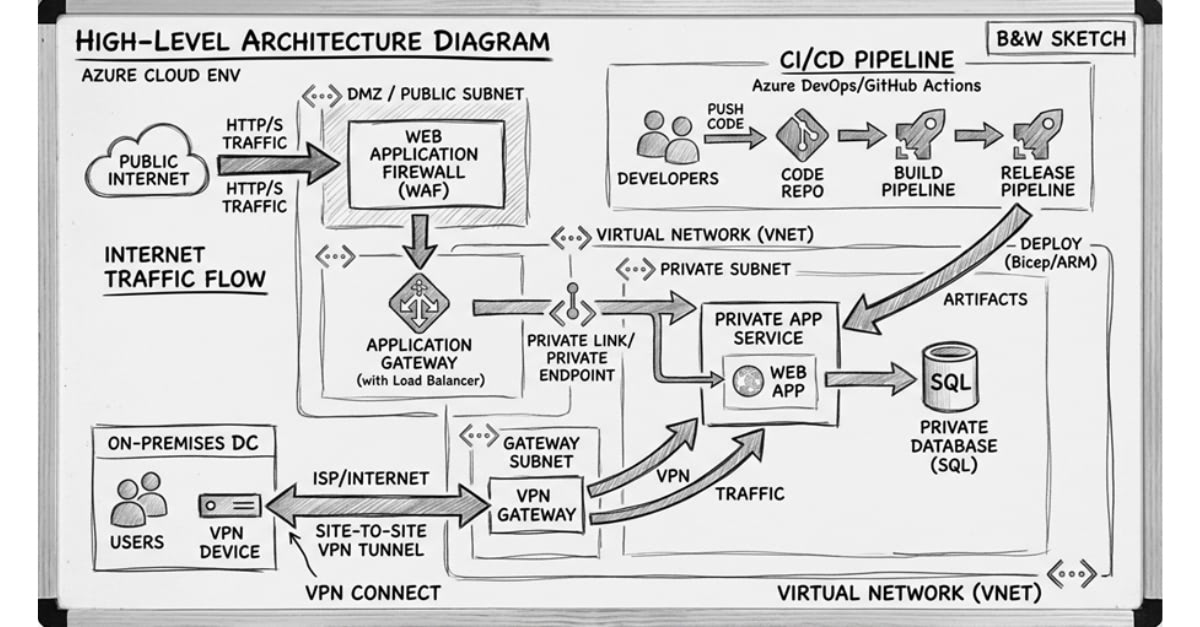
Step 1: Deploy the Network Foundation
Architecture begins with the network. You must create a dedicated Virtual Network (VNet) with clear subnet separation.
Private Endpoint Subnet: Dedicated for the App Service Private Link.
Application Gateway Subnet: Required for the App Gateway deployment.
GatewaySubnet: Required for the Azure VPN Gateway.
Design principles:
- Ensure there are no overlapping CIDR blocks.
- Size the subnets to accommodate future growth.
- Align the design with Azure Landing Zone standards.
Step 2: Enable Hybrid Connectivity
To allow on-premises infrastructure to communicate with the Azure environment, configure an Azure VPN Gateway.
Typically, this involves:
- A Site-to-Site VPN connection.
- Defined address spaces that do not conflict with your Vnet’s.
Once established, Azure and on-premises networks can communicate securely.
Step 3: Add the Private Endpoint
This is the turning point of the architecture. Using Azure Private Link, you connect the App Service to the VNet.
Conclusion
Combining Private Link + WAF + a Self-hosted CI/CD agent provides an enterprise-grade architecture without the enterprise-grade price tag. For the vast majority of organizations, this represents the perfect “sweet spot” between security and cost optimization.
If your strict regulatory compliance mandates that the compute infrastructure itself cannot be multi-tenant at the hardware level, ASE remains the only path. For everyone else, this is the way forward.
majority of organizations, this represents the perfect “sweet spot” between security and cost optimization.
If your strict regulatory compliance mandates that the compute infrastructure itself cannot be multi-tenant at the hardware level, ASE remains the only path. For everyone else, this is the way forward.
What’s Next?
If you are looking for secure ways to connect your App Service to on-premises resources but do not have a VPN Gateway or ExpressRoute available, there is another powerful alternative.